Working with the project hosted on a remote server

Warning
Someone gives the advice to use SFTP Drive. It is a very slow program.
When I work with documentation, I write it directly in console using vim. After a file was changed, inotifywait runs sphinx build automatically. Built documentation is shared using Nginx under Docker. Please, read this: Sphinx/View your documentation on another host.
Now we are going to use Samba under Docker.

I suppose that you are already installed Docker. If not, please read this: Install docker
Get uid and gid.
$ id
uid=1000(shmakovpn) gid=1000(shmakovpn) ...
Run the docker container.
$ docker run \
   -it --rm \
   -p 139:139 \
   -p 445:445 \
   -p 137:137/udp \
   -p 138:138/udp \
   -e USERID=1000 \
   -e GROUPID=1000 \
   -v /home/shmakovpn/projects:/mount \
   -d dperson/samba \
   -p -n -r -S -w SHMAKOVPN \
   -u "shmakovpn;12345678" \
   -s "public;/mount;yes;no;no;shmakovpn"
0c345071b5bace3d0e43092552db5362afea5fef55d13e323072fb34159beaa3
Mount samba share to a PC with an IDE.
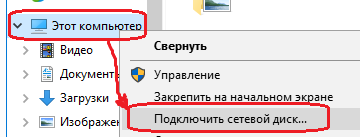
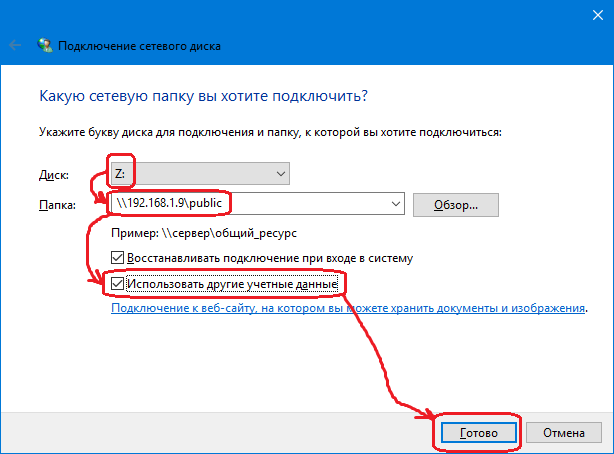
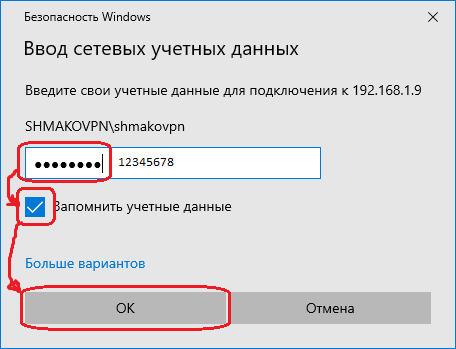
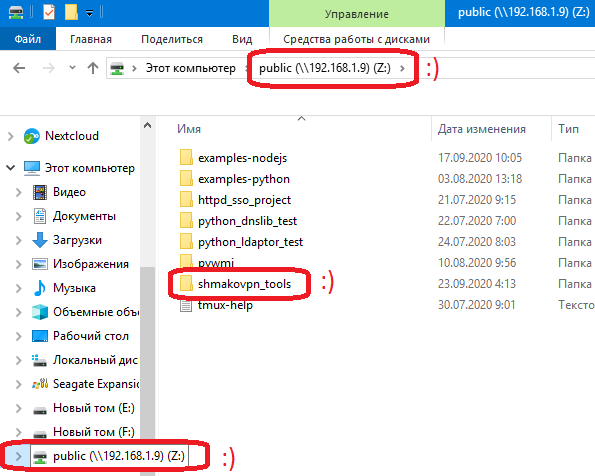
Run an IDE, then open a project on the drive Z:.
Samba AD integration (Centos 7)
Join your Centos server to an Active Directory Domain. Please, read this.
Configure time synchronization.
$ sudo vim /etc/chrony.conf
server dc.shmakovpn.ru iburst  # Add your domain controllers here
# server 0.centos.pool.ntp.org iburst
# server 1.centos.pool.ntp.org iburst
# server 2.centos.pool.ntp.org iburst
# server 3.centos.pool.ntp.org iburst
$ sudo systemctl restart chronyd
Verify hostname resolution
Samba will try to register the hostname in AD DNS zone. Thus, the net utility must be able to resolve the hostname of the server using DNS or /etc/hosts file.
To check DNS resolution
$ nslookup $(hostname)

Server:         192.168.1.2
Address:        192.168.1.2#53

Name:   c7.shmakovpn.ru
Address: 192.168.1.8
If the hostname of your server cannot be resolved using DNS, add the record shown below to /etc/hosts.
$ sudo vim /etc/hosts
192.168.1.8 c7.shmakovpn.ru c7
Note
Because the hostname of my server was resolved successfully, I don’t need to add the record to /etc/hosts.
Install packages
$ sudo yum install -y samba
Looking for the samba config file
$ smbd -b | grep CONFIGFILE
    CONFIGFILE: /etc/samba/smb.conf
Edit the config file of samba.
$ sudo vim /etc/samba/smb.conf
Note
We will not install winbind because earlier the server was joined to the domain using realmd. Please, don’t worry with winbind keywords in the config file.
[global]
    workgroup = SHMAKOVPN
    security = ADS
    realm = SHMAKOVPN.RU
    winbind refresh tickets = yes
    # logging
    log file = /var/log/samba/log.%m
    log level = 0 vfs:2 auth:2 winbind:0 passdb:0 sam:0
    max log size = 500000
    # acl
    vfs objects = acl_xattr
    inherit owner = yes
    inherit acls = yes
    inherit permissions = yes
    map acl inherit = yes
    store dos attributes = yes
    locking = no
    # we will use etended attributes, need to disable mapping DOS attributes to UNIX attributes
    map archive = no
    map system = no
    map hidden = no
    map readonly = no
    # useful for debugging
    winbind enum users = yes
    winbind enum groups = yes

    # disable printing
    load printers = no
    printing = bsd
    printcap name = /dev/null
    disable spoolss = yes

    # idmap config for BUILTIN accounts
    idmap config * : backend = tdb
    idmap config * : range = 3000-7999

    # idmap mapping
    idmap config SHMAKOVPN:backend = ad
    idmap config SHMAKOVPN:range = 10000-999999

[www]
    comment = Userspy www repository
    path = /var/www
    public = no
    writable = yes
    guest ok = no
    create mask = 0755
    directory mask = 0755

    # audit
    vfs objects = full_audit acl_xattr
    full_audit:prefix = %S|%I|%m|%u
    full_audit:failure = connect disconnect opendir mkdir rmdir closedir open close read pread write pwrite sendfile rename unlink chmod fchmod chown fchown chdir ftruncate lock symlink readlink link mknod realpath
    full_audit:success = connect disconnect opendir mkdir rmdir closedir open close read pread write pwrite sendfile rename unlink chmod fchmod chown fchown chdir ftruncate lock symlink readlink link mknod realpath
    full_audit:facility = local5
    full_audit:priority = debug

    # access for users and groups
    valid users = @"home-users@shmakovpn.ru"
    write list = @"home-users@shmakovpn.ru"
    admin users = @"home-users@shmakovpn.ru"
Open explorer on your Windows PC and go \c7.shmakovpn.ruwww. Access using IP-address will not work, because we using Kerberos authentication.
You have to use the hostname used when the server was joined to the domain. You have to use the hostname used when the server was joined to the domain. This hostname saved in /etc/krb5.keytab in host record.
$ sudo ktutil
ktutil:  rkt /etc/krb5.keytab
ktutil:  list
slot KVNO Principal
---- ---- ---------------------------------------------------------------------
   1    1 restrictedkrbhost/c7.shmakovpn.ru@SHMAKOVPN.RU
   2    1        restrictedkrbhost/C7@SHMAKOVPN.RU
   3    1 restrictedkrbhost/c7.shmakovpn.ru@SHMAKOVPN.RU
   4    1        restrictedkrbhost/C7@SHMAKOVPN.RU
   5    1 restrictedkrbhost/c7.shmakovpn.ru@SHMAKOVPN.RU
   6    1        restrictedkrbhost/C7@SHMAKOVPN.RU
   7    1 restrictedkrbhost/c7.shmakovpn.ru@SHMAKOVPN.RU
   8    1        restrictedkrbhost/C7@SHMAKOVPN.RU
   9    1 restrictedkrbhost/c7.shmakovpn.ru@SHMAKOVPN.RU
  10    1        restrictedkrbhost/C7@SHMAKOVPN.RU
  11    1        host/c7.shmakovpn.ru@SHMAKOVPN.RU
  12    1                     host/C7@SHMAKOVPN.RU
  13    1        host/c7.shmakovpn.ru@SHMAKOVPN.RU
  14    1                     host/C7@SHMAKOVPN.RU
  15    1        host/c7.shmakovpn.ru@SHMAKOVPN.RU
  16    1                     host/C7@SHMAKOVPN.RU
  17    1        host/c7.shmakovpn.ru@SHMAKOVPN.RU
  18    1                     host/C7@SHMAKOVPN.RU
  19    1        host/c7.shmakovpn.ru@SHMAKOVPN.RU
  20    1                     host/C7@SHMAKOVPN.RU
  21    1                         C7$@SHMAKOVPN.RU
  22    1                         C7$@SHMAKOVPN.RU
  23    1                         C7$@SHMAKOVPN.RU
  24    1                         C7$@SHMAKOVPN.RU
  25    1                         C7$@SHMAKOVPN.RU
ktutil:  q
Configure the samba audit log
$ sudo touch /etc/rsyslog.d/samba.conf
$ sudo vim /etc/rsyslog.d/samba.conf
$RepeatedMsgReduction on  # do not log repeated massages
$SystemLogRateLimitInterval 1
$SystemLogRateLimitBurst 1000
$IMUxSockRateLimitBurst 1000
$IMUxSockRateLimitInterval 1
$IMUxSockRateLimitSeverity 5
local5.debug /var/log/samba/log.audit
$ sudo systemctl restart rsyslog
Configure samba logs rotation.
$ sudo touch /etc/logrotate.d/samba
$ sudo vim /etc/logrotate.d/samba
/var/log/samba/log.audit {
    daily
    size 400M
    maxsize 500M
    missingok
    rotate 20
    postrotate
        /etc/init.d/rsyslog restart
    endscript
    compress
    compresscmd /usr/bin/bzip2
    uncompresscmd /usr/bin/bzip2
    compressext .bz2
    notifempty
}
Configure firewalld.
$ sudo firewall-cmd --zone=public --add-service=samba --permanent
$ sudo firewall-cmd --reload
Configure SELinux.
Take a look at the path to the samba share folder, it is the path to a web server content.
$ sudo ls -alZ /var/www
drwxr-xr-x.  5 root root system_u:object_r:httpd_sys_content_t:s0       62 июн  8 23:16 .
drwxr-xr-x. 23 root root system_u:object_r:var_t:s0                   4096 окт  2 13:47 ..
drwxr-xr-x.  2 root root system_u:object_r:httpd_sys_script_exec_t:s0    6 июн  8 23:16 cgi-bin
drwxr-xr-x.  2 root root system_u:object_r:httpd_sys_content_t:s0        6 июн  8 23:16 html
...
The web server needs that the /var/www folder and all of its content must have a right SELinux context. Something like httpd_sys_content_t and etc. But Samba has its own SELinux context, named samba_share_t, and a file or a folder can have only one context. To solve this conflict let’s stay the webserver’s contexts and allow Samba to read/write anywhere.
$ sudo setsebool -P samba_export_all_rw 1
Samba AD integration (Centos 8)
Centos 8 AD integration process almost the same as Centos 7.
If samba daemon starting failed, and there are ERROR: failed to setup guest info in /var/log/smbd.log. Please run
$ sudo net -s /dev/null groupmap add sid=S-1-5-32-546 unixgroup=nobody type=builtin
In Centos 8 samba requires winbind. Install packages.
$ sudo dnf install -y samba-winbind-clients
Join to domain (you are already joined using realmd, but it not the same). Join once again using the net utility.
$ sudo net ads join -U shmakovpn shmakovpn.ru
Enter shmakovpn's password:
Using short domain name -- SHMAKOVPN
Joined 'C8-DNS-BIND' to dns domain 'shmakovpn.ru'
DNS Update for c8-dns-bind.shmakovpn.ru failed: ERROR_DNS_UPDATE_FAILED
DNS update failed: NT_STATUS_UNSUCCESSFUL
$ sudo net ads testjoin
Join is OK
Ignore DNS update failed error.
Start winbind.
$ sudo systemctl enable winbind
$ sudo systemctl start winbind
Edit samba config
$ sudo vim /etc/samba/smb.conf
# access for users and groups
# valid users = @"home-users@shmakovpn.ru"
# write list = @"home-users@shmakovpn.ru"
# admin users = @"home-users@shmakovpn.ru"
valid users = "@SHMAKOVPN\home-users"
write list = "@SHMAKOVPN\home-users"
admin users = "@SHMAKOVPN\home-users"
Restart samba
$ sudo systemctl restart smb
Configure SELinux.
In Centos 8 dac_override must be allowed for Samba. There is no direct way of how to do this. We need to create the SELinux module and install it.
$ sudo semodule -DB  # disable suppressing the AVC log
$ sudo logrotate -v -f -l /var/log/audit/audit.log  # rotate AVC log
$ # Connect to share and try to create a new file
$ sudo ausearch -t avc -ts recent  # looking for AVC denied dac_override for smbd
...
----
time->Sun Oct 11 13:07:12 2020
type=AVC msg=audit(1602410832.702:720): avc:  denied  { dac_override } for  pid=260711 comm="smbd" capability=1  scontext=system_u:system_r:smbd_t:s0 tcontext=system_u:system_r:smbd_t:s0 tclass=capability permissive=0
----
...
$ # generate the SELinux module
$ echo "type=AVC msg=audit(1602410832.702:720): avc:  denied  { dac_override } for  pid=260711 comm="smbd" capability=1  scontext=system_u:system_r:smbd_t:s0 tcontext=system_u:system_r:smbd_t:s0 tclass=capability permissive=0" | audit2allow -M se_smbd_allow_dac_override_policyllow_dac_override_po
$ sudo semodule -i se_smbd_allow_dac_override_policy.pp  # install created module
$ sudo semodule -B  # enable suppressing the AVC log